MirrorAPP+
- 3.1
- Rating
- 50.00K
- Installs
- Free
- Price

 Analysis by App-foxy
MirrorAPP+ is the kind of driving app I would describe as useful rather than essential. Its appeal is easy to understand: it aims to keep a driver’s phone experience connected to the road instead of making the phone feel like a separate gadget. After spending time with it, my view is that it works best for people who want a straightforward companion for everyday journeys and are willing to adjust their setup around the app. It is less convincing for drivers who already have a polished built-in dashboard system and expect every part of their phone to behave perfectly from the first launch.
That distinction matters because Auto & Vehicles apps are often judged by a very practical standard. A navigation or driving companion does not need to be flashy, but it does need to reduce distraction, make common actions easier, and remain predictable when the car is moving. MirrorAPP+ has a sensible idea behind it, and the free entry point makes it easy to try. My recommendation is therefore conditional: give it a chance if your current in-car setup feels fragmented, but do not assume that a phone-based solution will automatically replace a dedicated vehicle interface.
How MirrorAPP+ fits into an everyday driving routine
The first thing I noticed is that the app makes more sense when treated as part of a routine, not as something to open casually while already driving. The best experience comes from preparing before leaving: mount the phone securely, check that the display is visible without blocking the road, and decide which driving tasks you actually want to handle through the app. That small amount of preparation makes the difference between a calm trip and a screen that becomes another source of fuss.
You May Also Like

 Google Keep - Notes and lists
Google Keep’s Quiet Growth Shows the Appeal of Simpler Notes
As mobile work gets busier, Google Keep keeps winning a simple contest: capture a thought quickly, find it later, and get on with the day.

 Blood Strike: 2.5 Anniversary
Blood Strike’s Loadouts Turn Every Drop Into a Tactical Gamble
A close look at Blood Strike’s custom loadouts: how fast access to signature weapons reshapes its battle royale rhythm, rewards preparation, and narrows the gap between fights.

 Pandora - Music & Podcasts
Pandora’s Music Is Easy to Start, but Harder to Recover
Pandora’s strength is its low-effort path from a seed to a station. Its weak spot is how much confidence it asks you to place in connection, setup, and quiet recovery.

 8 Ball Pool
 Is Built on Rivalries, Rematches, and Routine
A close look at the rivalries, rematches, shared routines, and unanswered safety questions that turn a quick pool match into a persistent mobile community.

 Samsung Music
’s Quiet Strength Is Playing What You Already Own
Its reach comes less from spectacle than from dependable access to a personal library. That simplicity is both the app’s strongest retention engine and its ceiling.

 AccuWeather: Weather Radar
AccuWeather Review: A Quick, Clear Forecast for Everyday Decisions
For everyday plans, the best forecast is the one you can understand quickly. AccuWeather makes rain timing, radar, and local conditions easy to act on, with a few trade-offs.
More From Our News Desk



For a short commute, I would use it as a central place to keep the driving experience organized. I could begin the trip with the phone already positioned, glance at the relevant information, and avoid repeatedly reaching for unrelated phone apps. That is the practical strength of a driving companion: it can turn several small actions into one repeatable workflow. The value is not necessarily dramatic on a single journey, but it becomes clearer when the same setup is used every morning.
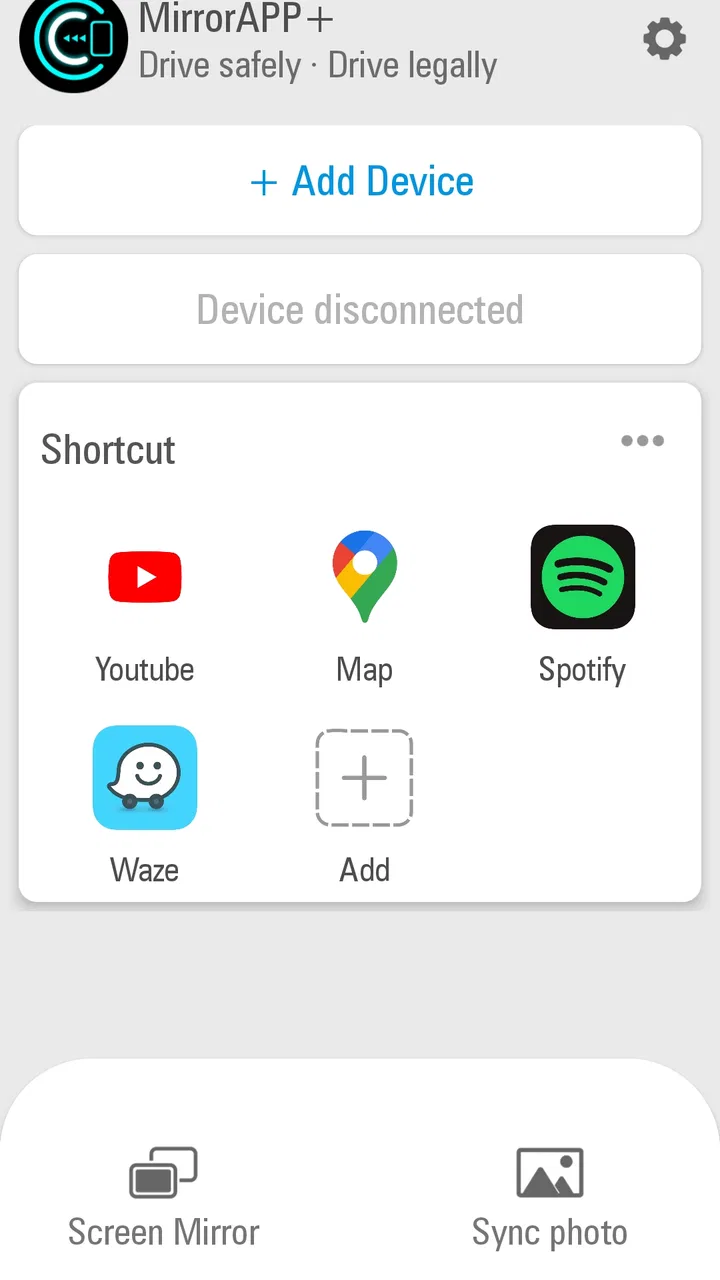
A realistic example is a weekday trip to work. Before pulling away, I would connect the phone, set the route or driving view, and leave the device alone. If traffic changes or I need to make a quick adjustment, the point is to interact briefly rather than browse through a normal phone interface. On the return journey, the same arrangement can be reused without rebuilding the whole experience. This is where MirrorAPP+ feels more useful than simply placing a phone in a dashboard holder and relying on whichever apps happen to be open.
It is also worth being realistic about the word “mirror.” A mirrored phone experience is not automatically the same as a vehicle manufacturer’s native system. The quality of the result depends on the phone, the vehicle, the connection method, and how well the interface behaves in that particular setup. I would test it while parked, not during a busy trip. That first check helps reveal whether the controls are comfortable, whether the display remains readable, and whether the arrangement encourages quick glances instead of prolonged attention.
The strongest part is the reduction of small distractions
My most positive impression is that MirrorAPP+ can make a phone feel less like a collection of separate applications and more like a driving tool. That sounds modest, but it is important. Drivers often lose time switching between navigation, calls, music, and other phone functions. A companion designed around the vehicle context can make those transitions feel more deliberate.
I would not call this a replacement for careful driving. It still requires the driver to set things up responsibly and keep interaction brief. However, the app’s central idea is useful because it encourages a driver to decide what belongs in the driving environment before the journey begins. That is a better habit than unlocking a phone repeatedly whenever something changes.
Another strength is accessibility. MirrorAPP+ is free, carries an Everyone age rating, and is aimed at a broad group of drivers rather than a narrow professional audience. Its developer is Gigaboyz.com LIMITED, and the app has reached over fifty thousand installs. That does not prove that it will suit every vehicle, but it does make it reasonable to test without committing money first.
The current version is 2.5.12.4, and the app runs on Android 7.0 or later. That minimum requirement is helpful for people using older Android phones, although compatibility with the operating system is only one part of the equation. A phone may install the app successfully and still deliver an awkward experience in a particular car. I would treat installation as the beginning of testing, not as proof that the complete driving setup will be seamless.
Small preparation choices make a noticeable difference
One practical tip I would give a new user is to create a simple pre-drive checklist. Keep the phone charged, position it where a glance is natural, and open the driving setup before moving. If the app is being used with a vehicle display or another connection, establish that connection while parked. This avoids the common mistake of trying to solve pairing or visibility problems at a junction.
A second tip is to keep the driving screen intentionally simple. The temptation with any phone-based car tool is to expose too much information because the phone can display it. I found that the app is more useful when it supports a few predictable actions rather than becoming a dashboard for everything. If a function is not needed on the current trip, leaving it out reduces the number of decisions made behind the wheel.
A third trade-off concerns the phone itself. A larger display may be easier to read, but it can also be harder to place safely. A smaller phone may fit the dashboard better while requiring more careful glances. MirrorAPP+ cannot solve that physical limitation. The best setup is the one that keeps the screen stable, visible, and secondary to the road, even if it is not the most visually impressive arrangement.
I also recommend testing the app on both a quiet local route and a more demanding journey before relying on it for an unfamiliar trip. A short local drive lets you judge the basic workflow without adding navigation pressure. A longer trip then reveals whether the arrangement remains comfortable after repeated glances and adjustments. This two-stage approach is more useful than deciding after only a few minutes in a parked car.
Where the experience becomes less convincing
The main weakness is that a phone-based mirror experience can introduce another layer between the driver and the vehicle. When everything works, that layer may feel convenient. When the connection, display, or control arrangement is temperamental, the app becomes something the driver has to manage. For me, that is the central limitation: the app can simplify the driving experience, but it can also add setup friction that native systems avoid.
This is particularly important for people who want a completely hands-off experience. MirrorAPP+ is not the right choice if your expectation is to install it once, forget about configuration, and receive the same polished behavior in every car. Different vehicles and phones can create different practical results. Even without a technical failure, the physical placement of the phone and the way the car presents information may determine whether the app feels natural.
The app’s average rating is 3.2 from roughly two hundred ratings, with twenty-five written reviews. I read that as a sign to keep expectations measured rather than as a reason to dismiss the app. A middling score often reflects the fact that driving tools are highly dependent on individual hardware and routines. For a user with a compatible, well-positioned setup, the experience may be perfectly adequate; for someone with a restrictive dashboard or a demanding expectation of integration, the same app may feel frustrating.
There is also a safety-related limitation that should not be ignored. Any interface visible while driving can become distracting if the driver keeps checking it. I would avoid using the app for browsing or experimenting once the car is moving. Voice controls, steering-wheel controls, or a passenger should handle anything that requires more than a quick glance. If the app encourages you to spend time looking at the phone, it is being used in the wrong way, regardless of how convenient the features appear.
Another weakness is that the app’s usefulness may decline when the journey does not follow a regular pattern. Commuters and frequent local drivers can build a stable routine around it. Occasional drivers, rental-car users, and people who switch between several vehicles may spend more time arranging the setup than benefiting from it. In those cases, the car’s own interface or a familiar navigation app used through a standard mount may be the simpler option.
Who should use it, and who should choose something else?
I think MirrorAPP+ is best suited to Android users who drive regularly, want a more organized phone-based car experience, and are comfortable spending a little time testing the arrangement. It is especially appealing when the vehicle does not offer the level of integration the driver wants, but the phone is modern enough to handle the daily workload. The free price removes the biggest barrier to trying it, so curious users can judge the fit with their own car instead of relying only on general impressions.
It may also suit families who share a vehicle, provided each driver agrees on a safe and repeatable setup. The important point is consistency. If one person mounts the phone in a clear position and another leaves it loose or poorly angled, the app will not compensate for the difference. A shared checklist can help: place the phone, connect before moving, select the needed driving view, and stop interacting once the trip begins.
I would be more cautious about recommending it to drivers who already have an excellent built-in infotainment system. If your car offers reliable navigation, media controls, and hands-free communication through its native interface, adding a phone mirror may provide little benefit. The extra screen can even create confusion about which system should handle a task. In that situation, the native system is usually the cleaner choice, while the phone can remain a backup.
Professional drivers should also judge it by their operational needs rather than by the convenience of a free download. Someone who spends many hours on the road may care more about stable integration, predictable controls, and minimal setup than about experimenting with a companion app. MirrorAPP+ can be useful as a secondary tool, but I would not make it the only part of a work-critical driving arrangement without extended testing in the actual vehicle.
For newer Android phones, the minimum Android 7.0 requirement should not be a major obstacle. Still, users with older hardware should pay attention to responsiveness and screen readability during their own trial. An app can technically run while the overall experience remains too slow or cramped for comfortable driving. If the phone struggles with ordinary navigation or becomes hot during extended use, a dedicated car system is likely to be a better long-term answer.
How it compares with the usual alternatives
The closest alternative is often not another specialized app but the phone’s normal navigation and media setup inside a dashboard mount. That approach is familiar and flexible, but it can leave the driver jumping between unrelated apps. MirrorAPP+ has an advantage when its driving-focused arrangement makes those actions feel more unified. The ordinary phone setup wins, however, when the driver values maximum familiarity and does not want to learn another workflow.
A second alternative is the vehicle’s native infotainment system. Native systems generally have the advantage of physical integration, predictable placement, and controls designed around that particular car. They can be less flexible than a phone, though, especially when their maps or interface feel dated. MirrorAPP+ is more attractive when the native system is limited and the phone offers a better day-to-day experience, but it cannot remove every limitation created by the vehicle itself.
There is also the broader category of established phone-to-car platforms. Those options may be preferable for users who want a widely recognized ecosystem with a familiar layout across different vehicles. MirrorAPP+ makes more sense for someone who wants to try a free, focused alternative and is prepared to evaluate it personally. I would not choose it solely because the name suggests a complete replacement for every other system; I would choose it if its actual workflow is more comfortable in my car.
The useful comparison is therefore not about which app has the longest feature list. It is about which arrangement demands the fewest distracting decisions. If MirrorAPP+ lets you prepare once and then interact only briefly, it earns its place. If it requires repeated reconnection, awkward reaching, or constant checking, the simpler mount-and-navigation approach may be safer and less annoying.
My verdict after weighing convenience against friction
MirrorAPP+ is a sensible free experiment for Android drivers who want to bring a more organized phone experience into the car. Its strongest quality is not spectacle; it is the possibility of turning a loose collection of phone tasks into a more deliberate driving routine. That can be genuinely helpful on regular commutes and everyday errands, especially when the vehicle’s own technology feels incomplete.
At the same time, I would not recommend installing it with the expectation of universal, effortless integration. The app’s success depends heavily on the phone, vehicle, mounting position, and driver habits. Its 3.2 average shows that the experience is not uniformly smooth, and the practical limitations of any screen-based driving tool remain important. The app should support attention to the road, never compete with it.
My final recommendation is straightforward: try it while parked, test it on familiar roads, and keep it only if it makes your routine simpler. If you drive regularly and your current setup feels scattered, MirrorAPP+ may become a useful companion. If your car already handles the same tasks cleanly, or if you dislike configuring phone-based tools, staying with the native system or a simpler established alternative will probably serve you better. The right reason to use MirrorAPP+ is reduced friction during a real journey, not the promise of adding another screen.
FAQs for MirrorAPP+
01What is MirrorAPP+ and how does it work?
MirrorAPP+ is a versatile app that turns your smartphone into a high-quality mirror. It utilizes your device's front camera to provide a clear and adjustable reflection. Users can zoom, adjust brightness, and apply filters to enhance their appearance. It's designed to be user-friendly and provides a seamless experience for personal grooming.
02Is MirrorAPP+ free to download and use?
MirrorAPP+ offers a free version with basic functionalities, but to access premium features like enhanced filters and ad-free experience, users may need to purchase a subscription. It's available on both Android and iOS platforms, providing flexible options to suit different user needs.
03What are the key features of MirrorAPP+?
The app offers a range of features including zoom capability, adjustable brightness, night mode, and a selection of filters to enhance your reflection. It also includes a freeze-frame feature allowing users to pause their reflection for closer inspection. These features make it a handy tool for makeup application and other grooming tasks.
04Is MirrorAPP+ safe to use on my device?
Yes, MirrorAPP+ is designed with user privacy and security in mind. It does not store any images or personal data from your device. However, as with any app, it's recommended to download it from official app stores to avoid any security risks associated with counterfeit apps.
05How does MirrorAPP+ differ from using the regular camera app as a mirror?
While a regular camera app can function as a basic mirror, MirrorAPP+ offers enhanced functionalities specifically designed for a superior mirroring experience. Features such as brightness control, zoom, and specialized filters provide a clearer and more adaptable reflection, making it more effective for detailed tasks like makeup application.
Pros
- User-friendly interface for easy navigation.
- High-quality mirrored images and videos.
- Supports various mirror effects and filters.
- Fast processing with minimal lag time.
- Compatible with both Android and iOS devices.
Cons
- In-app purchases can be expensive.
- Ads appear frequently during use.
- Occasional crashes in older devices.
- Limited free features available.
- Requires internet for full functionality.

MirrorAPP+
Gallery